S3 Versioning retains multiple versions under one key, making many accidental overwrites and ordinary deletes recoverable while the required version still exists. It does not protect against every deletion or provide an independent backup by itself. Retention, permissions, encryption-key availability, and restoration procedures determine whether the saved history can actually recover the application.
Distinguish versioning states
In a versioning-enabled bucket, a PUT creates a new version ID and preserves earlier data versions. Each version stores the whole object, not merely its changed bytes. Repeatedly overwriting a large object therefore has a different storage profile from a block-level incremental snapshot, even when the visible key count stays constant.
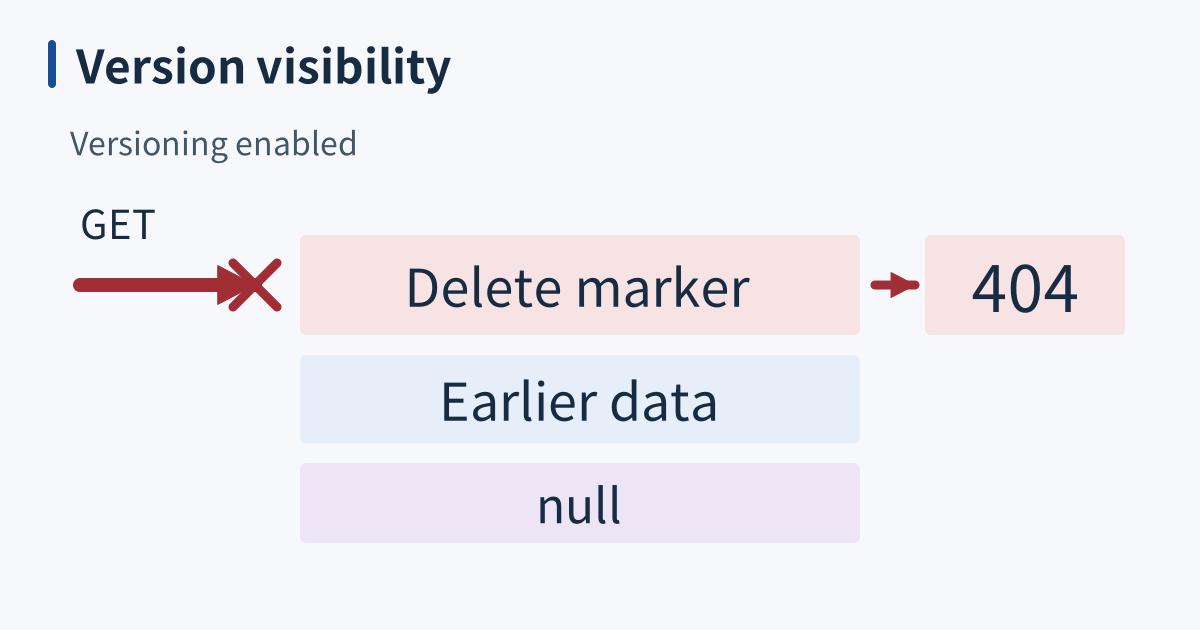
An object that predates enablement keeps its null version ID. New versioned writes do not overwrite that null version. Once enabled, a bucket cannot return to the never-versioned state, although versioning can be suspended. Under suspension, subsequent writes use the null-version slot and can replace an existing null version. Specify which state applies before describing overwrite safety.
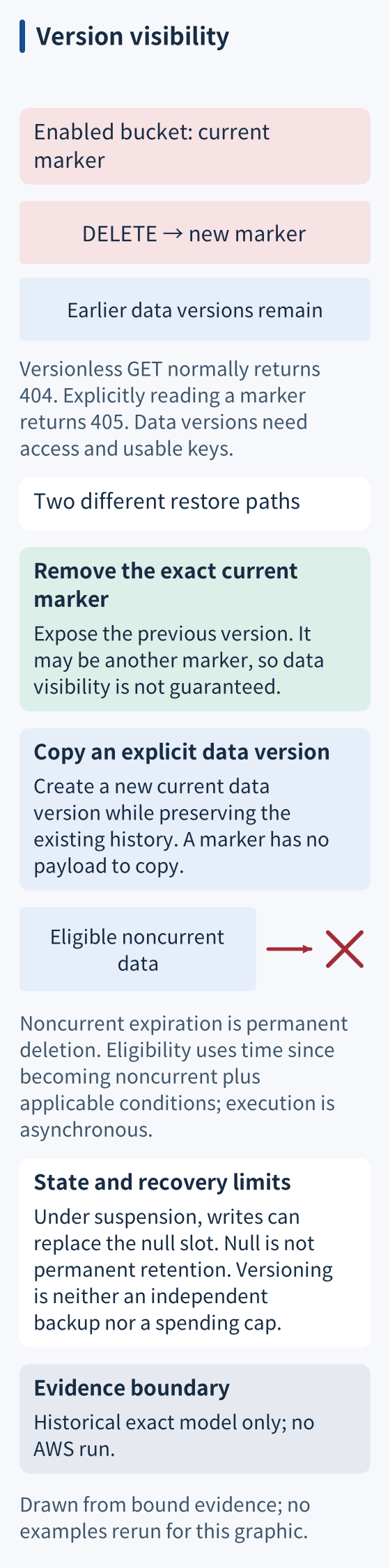
Null is a real version identifier, not a guarantee of permanent retention. A null version that becomes noncurrent can be subject to noncurrent expiration. It can also be explicitly targeted for deletion when authorized. A listing containing null therefore does not prove that old data is exempt from lifecycle cleanup.
A delete marker changes visibility
An ordinary DELETE without a version ID in an enabled bucket creates a delete marker. When that marker is current, a versionless GET normally returns 404; explicitly requesting a delete-marker version returns 405. Earlier data remains available by its data-version ID, subject to access, storage-class, and encryption requirements.
Delete markers have no object payload but are not free zero-byte storage entries: S3 charges for the key-name bytes they store. Removing the specific current marker exposes the preceding version, which could itself be another marker. Alternatively, copying an explicit earlier data version creates a new current data version while preserving history. A marker cannot be copied as if it were object data.
Deleting a particular data version is a different, permanent operation. Versioning alone cannot restore that deleted version. MFA Delete, when configured, adds authentication for permanent version deletion and changes to versioning state; it is not automatically active whenever versioning is enabled. AWS does not support using MFA Delete with lifecycle configurations.
Lifecycle expresses a retention tradeoff
Current-version Expiration and NoncurrentVersionExpiration do different jobs. In an enabled bucket, expiring current data generally creates a marker and makes that data noncurrent. Noncurrent expiration permanently removes eligible older data versions. Eligibility uses time since becoming noncurrent, and optional retained-version counts add another condition. It is not simply the object’s original upload age.
Lifecycle execution is asynchronous. A thirty-day rule is not proof that exactly thirty versions remain at every instant. Rule filters, write frequency, retained-count settings, replication status, and Object Lock can affect what qualifies. Transitions to colder storage retain data with different storage, retrieval, and minimum-duration costs; calculate those costs against the actual object sizes and recovery needs.
When it breaks
Growing noncurrent bytes can raise costs while ordinary listings appear stable. Inspect version inventory and lifecycle scope rather than expecting a fixed version-to-key ratio to diagnose every case. A bucket does not need to be physically “full” for this to become expensive, and lifecycle is not a hard spending cap or the only possible retention control.
Overaggressive expiration creates the opposite problem: the required recovery version is permanently removed. Validate retention against the longest plausible detection delay and restore requirements. HEAD can inspect metadata but does not download and validate object contents; a successful metadata request alone is not a completed restoration test.
Check it quickly
Run this Python 3 model with assertions enabled. Retained historical executions cover these exact model bytes; this source review did not rerun them. It models an enabled bucket’s version stack entirely in memory, including a preexisting null data version. No AWS account, credentials, or remote object is used. Marker storage billing, real timestamps, permissions, lifecycle scheduling, and concurrent writes are deliberately outside the model.
versions = [("null", b"old"), ("v1", b"new")]
marker = ("d1", None)
versions.append(marker)
def get_current():
    payload = versions[-1][1]
    return (404, None) if payload is None else (200, payload)
assert get_current() == (404, None)
assert sum(len(data) for _, data in versions if data is not None) == 6
versions.remove(marker)
assert get_current() == (200, b"new")
print("remove current marker: previous data visible")
versions.append(("d2", None))
# Copy an explicit data version to create a new current version.
old = next(data for identifier, data in versions if identifier == "null")
versions.append(("v2", old))
assert get_current() == (200, b"old")
assert any(identifier == "d2" for identifier, _ in versions)
print("copy explicit data version: new current version; history retained")
# Noncurrent null versions are not inherently protected from deletion.
versions[:] = [entry for entry in versions if entry[0] != "null"]
assert get_current() == (200, b"old")
print("remove old null version: current copy remains")
The three outputs distinguish exposing a previous version, copying explicit historical data, and removing a noncurrent null version. Stored payload bytes remain through marker creation; this does not count the marker’s billable key bytes. For real recovery, inspect the exact key across paginated data-version and delete-marker listings, select an explicit data version, retrieve it, and validate its contents before changing production state.
Sources
- AWS S3 versioning, how versioning and the null version work, checked 2026-09-16.
- AWS S3 delete markers, what a delete marker does and how to undo it, checked 2026-09-16.
- AWS S3 lifecycle management, current and noncurrent expiration and transition rules, checked 2026-09-16.
- AWS expiring objects, eligibility, permanent noncurrent deletion and asynchronous execution, checked 2026-10-15.
- AWS MFA Delete, optional protection and lifecycle constraints, checked 2026-10-15.
- AWS restoring previous versions, explicit-version copying and restoration, checked 2026-10-15.