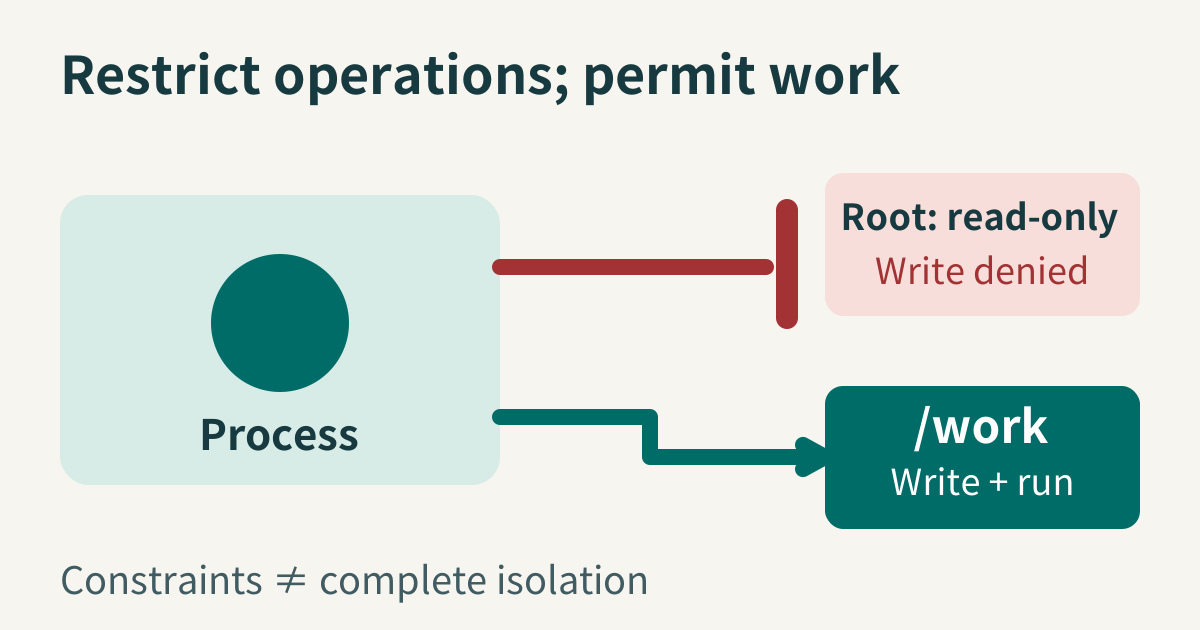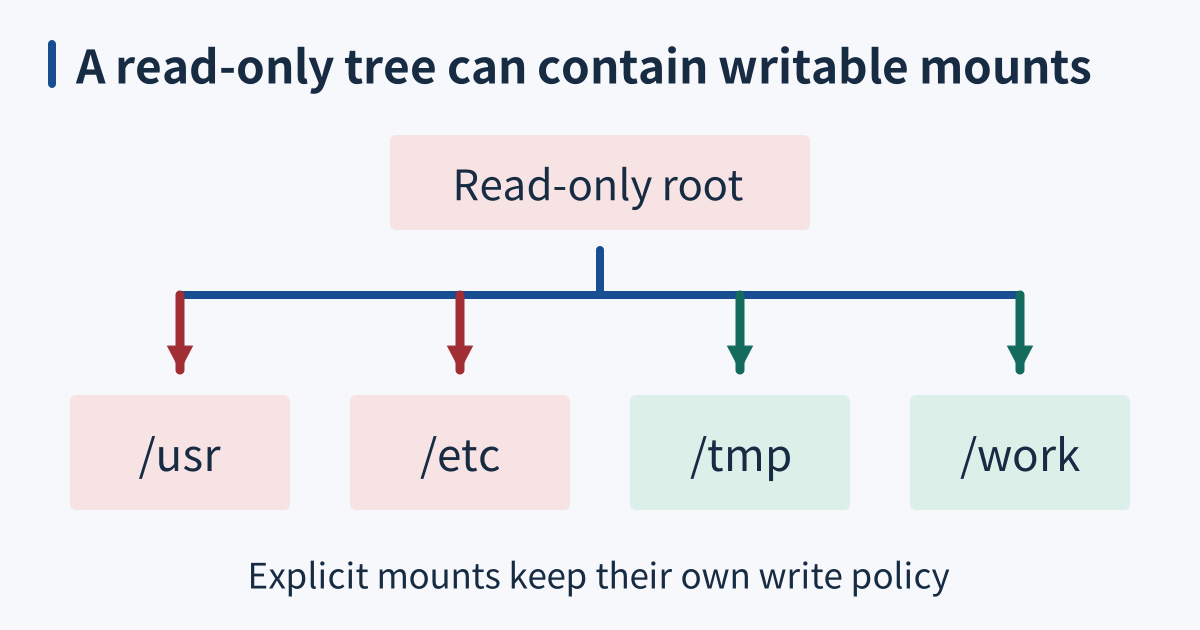
A read-only root filesystem prevents ordinary writes to the filesystem layer containing a service’s packaged code and configuration. Explicit mounts can still provide writable locations for runtime data. Its boundary is filesystem mutation. It does not by itself remove process privileges, prevent reading available data, or block communication with other services.
When it breaks
Applications often write outside their main data directory: temporary files, caches, lock files, generated configuration, or runtime state can appear during startup and uncommon operations. Making the root read-only can expose those assumptions as EROFS failures. Testing only a health endpoint may miss the path that generates a report, refreshes a cache, or performs shutdown cleanup.
A writable mount remains writable even when the container root layer is read-only. It can contain state that a compromised or faulty process can corrupt. Broadly mounting a writable directory over packaged paths can also defeat the intended protection for those paths. Inspect the effective mount layout rather than inferring the entire pathname tree’s behavior from one root-level option.
Read-only and confidential are different properties. A process may still read packaged files, execute existing programs, and send data through allowed network paths. The setting also does not guarantee protection after a container escape or against authority capable of changing the mount arrangement. Its contribution must be understood alongside credentials, capabilities, isolation, and application behavior.
Check it quickly
Use root inside a disposable Linux container with a read-only root, writable tmpfs at /tmp, and a separate writable volume at /work. Python 3.7 or later and /etc/os-release must be present; assertions must remain enabled. Earlier records report Linux 6.12.76 and Python 3.11.2, without host bind mounts, privileged mode or external networking. That run has not been reproduced here; these launch conditions are prerequisites, not all checked by the script:
from pathlib import Path
from tempfile import mkdtemp
import errno,os,socket,subprocess,sys,time,uuid

def cleanup_steps(steps, primary):
    failures=[]
    for label, action in steps:
        try:action()
        except BaseException as error:
            failures.append(label+': '+type(error).__name__+': '+str(error))
    if failures:
        message='cleanup incomplete or uncertain: '+'; '.join(failures)
        try:print(message,file=sys.stderr)
        except (OSError,ValueError):pass
        if primary is None:raise RuntimeError(message)
    return failures

def remove_file(path):
    try:path.unlink()
    except FileNotFoundError:pass

def require_empty(value):
    if value:raise RuntimeError('residual resources: '+str(value))

assert os.geteuid()==0,'run inside a disposable read-only-root container as root'
assert os.statvfs('/').f_flag&os.ST_RDONLY
name='xbcatm-readonly-'+uuid.uuid4().hex
print('fixture root-tree probe:',name,flush=True)
for base in [Path('/'),Path('/usr'),Path('/etc')]:
    path=base/name
    fd=None
    try:
        try:fd=os.open(path,os.O_WRONLY|os.O_CREAT|os.O_EXCL,0o600)
        except OSError as error:assert error.errno==errno.EROFS,error
        else:raise AssertionError('root filesystem accepted a new file')
    finally:
        primary=sys.exc_info()[1]
        if fd is not None:
            cleanup_steps([('probe descriptor',lambda:os.close(fd)),('unexpected root-tree file '+str(path),lambda:remove_file(path))],primary)
print('even this root process receives EROFS on paths in the read-only root, usr and etc tree')
for base in ['/tmp','/work']:
    assert not os.statvfs(base).f_flag&os.ST_RDONLY
    directory=None
    try:
        directory=Path(mkdtemp(prefix='xbcatm-write-',dir=base))
        path=directory/'data';path.write_bytes(b'allowed');assert path.read_bytes()==b'allowed'
        path.write_bytes(b'changed');assert path.read_bytes()==b'changed'
    finally:
        primary=sys.exc_info()[1]
        if directory is not None:
            cleanup_steps([('temporary data',lambda:remove_file(directory/'data')),('temporary directory',directory.rmdir)],primary)
print('explicit tmpfs and data-volume mounts remain writable, including overwriting their contents')
assert Path('/etc/os-release').read_text()
result=subprocess.run([sys.executable,'-c','print("executed")'],capture_output=True,text=True,check=True,timeout=5)
assert result.stdout.strip()=='executed'
def remaining(deadline):
    seconds=deadline-time.monotonic()
    if seconds<=0:raise TimeoutError('loopback exchange deadline expired')
    return seconds

def receive_exact(connection,count,deadline):
    chunks=[];received=0
    while received<count:
        connection.settimeout(remaining(deadline))
        chunk=connection.recv(count-received)
        if not chunk:raise EOFError('loopback peer closed before the complete payload')
        chunks.append(chunk);received+=len(chunk)
    return b''.join(chunks)

listener=client=connection=None
try:
    deadline=time.monotonic()+5
    listener=socket.socket();listener.settimeout(remaining(deadline))
    listener.bind(('127.0.0.1',0));listener.listen(1)
    client=socket.socket();client.settimeout(remaining(deadline));client.connect(listener.getsockname())
    listener.settimeout(remaining(deadline));connection,_=listener.accept()
    client.settimeout(remaining(deadline));client.sendall(b'local')
    assert receive_exact(connection,5,deadline)==b'local'
finally:
    primary=sys.exc_info()[1]
    cleanup_steps([(label,sock.close) for label,sock in [('connection',connection),('client',client),('listener',listener)] if sock is not None],primary)
print('reading packaged files, executing an existing program, and loopback network I/O still work')
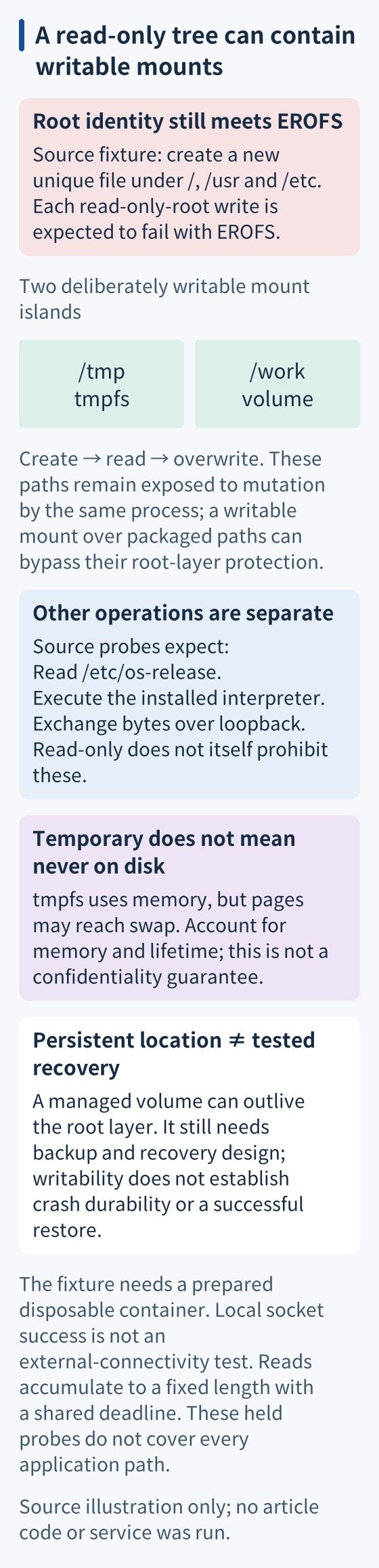
The script first checks the root filesystem’s reported read-only flag. It then attempts exclusive creation of uniquely named files under the root, /usr, and /etc. Each fails with EROFS, even for this root identity. Exclusive creation and unique names ensure the probes cannot overwrite a preexisting configuration file.
The fixture next checks that /tmp and /work do not report that flag. Temporary files can be created, read, and overwritten in both mounts. This confirms that writable exceptions remain operational and also establishes their exposure: the root setting does not protect the contents of those deliberately writable locations against the same process.
It reads /etc/os-release and executes an existing Python interpreter successfully. This distinguishes read-only storage from blocked reads or execution. Disallowing modification of packaged files can be useful, but it is not a general restriction on what existing code may do with its remaining authority.
Finally, a listener and client exchange a harmless payload over loopback. The container has no external networking, but local socket operations still work. The result shows that the filesystem option does not itself disable networking. It does not establish an external connectivity policy or test communication with any production service.
This revised fixture is unrun. Receive accumulates short reads, rejects early EOF and shares a five-second monotonic deadline with connect, accept and send. The interpreter timeout is also five seconds. Guards precede creation; independent socket/file cleanup preserves the original exception and fails on cleanup-only errors. Root identity, container markers and read-only flags do not prove isolation; verify launch conditions independently. The launcher owns container/volume teardown. Inspect reported leftovers after failure. Process creation, stalled filesystems and abrupt termination remain outside these bounds. These probes cover selected operations only; failure of root writes neither covers every application path nor restricts future writable mounts.
Separate packaged files, scratch space, and persistent state
Choose writable paths from observed application needs and configure the application to use them. Keep the exceptions narrow enough to explain their purpose. A failure should lead to identifying the required path and lifetime, rather than reopening the whole root layer to accommodate one unexpected cache or temporary file.
Use tmpfs for suitable temporary data and account for its memory use and lifecycle. Docker notes that tmpfs pages can be written to swap; calling this mount memory-backed is not a guarantee that sensitive bytes never reach persistent storage. Use a separately managed volume when state needs a lifetime independent of the container’s writable layer, with appropriate backup and recovery. A writable volume supplies a storage location; it does not automatically establish crash durability, confidentiality, or a tested restore procedure.
For systemd-managed services, mechanisms such as ProtectSystem and designated state or runtime directories express related filesystem restrictions with their own documented semantics. Validate the service’s actual view and identity rather than translating an option name mechanically between platforms. Exercise startup, ordinary work, exceptional operations, and cleanup, and confirm both prohibited writes and required writes behave as intended.
Further reading
Sources
- Docker container run reference, read-only root filesystems and separately mounted writable paths, checked 2026-09-12.
- Docker tmpfs mounts, temporary mount storage and lifecycle, checked 2026-09-12.
- Docker volumes, volume lifetime independent of a container root layer, checked 2026-09-12.
- systemd 252 execution environment, ProtectSystem and explicitly writable service directories, checked 2026-09-12.