“Command not found” identifies a lookup failure, but lookup does not always mean walking every directory in PATH. In ordinary Bash, a command word without a slash can resolve to a function, builtin, cached executable path, or a newly searched executable. An alias may already have changed the command while the input was read. Inspect the shell that actually reported the failure before reinstalling a tool that may already exist.
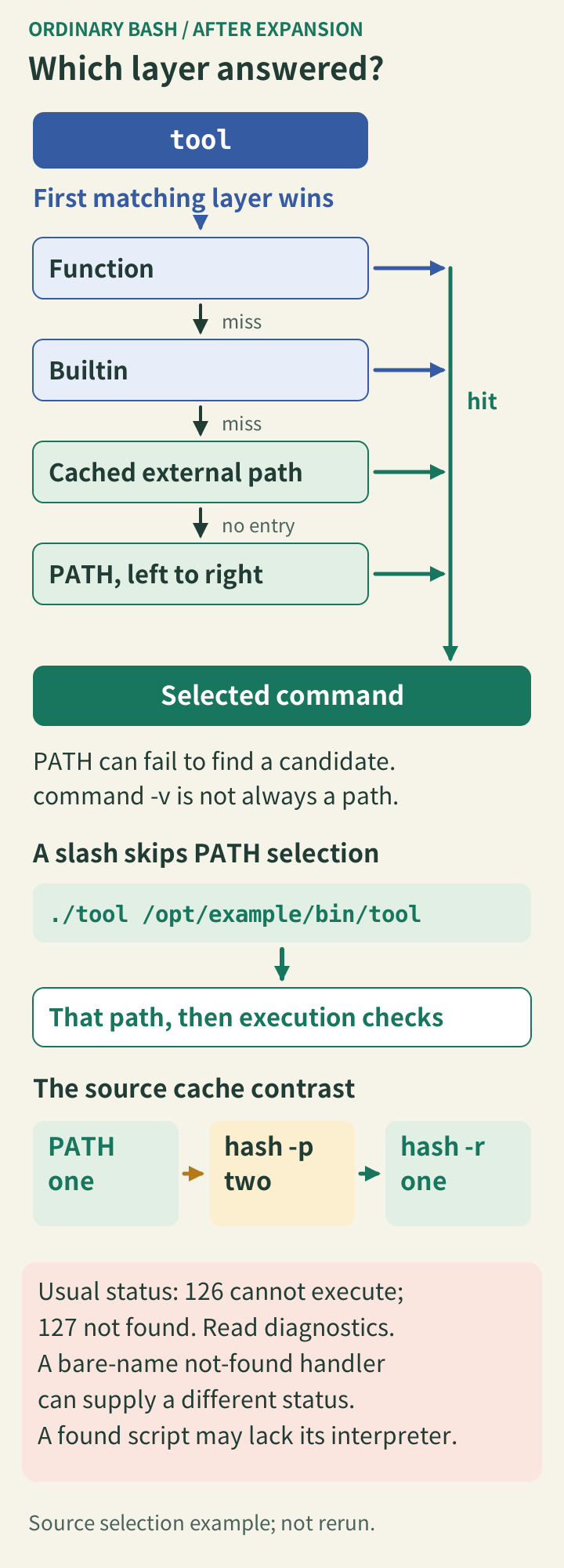
Know which lookup layer answered
After expansion, Bash checks functions and then builtins before searching for an external command. type name describes the current resolution, and type -a name exposes additional definitions or candidates. command -v name is useful for testing availability in that shell, but its result need not be a filesystem path. It can identify a function or builtin, so do not blindly treat the output as a file to copy.
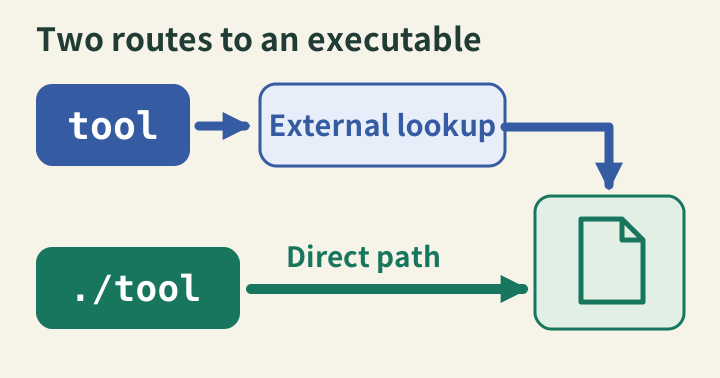
For external commands, directories in PATH are searched in order. An earlier executable can shadow a newer version later in the list. Bash also caches successful paths; hash -t name inspects a cached entry and hash -r clears the table. A changed file at an already cached location and a different path choice are separate issues. Starting a new terminal can hide this distinction by resetting shell state.
A slash selects a path directly
Any slash in the command word bypasses the external PATH search. ./tool addresses a file in the current directory; /opt/example/bin/tool addresses an absolute location. A bare tool does not automatically search the current directory. Empty or relative entries in PATH can make it do so, which allows the current working directory to change the selected executable.
Use explicit, trusted directories when assembling a service’s environment. A working interactive terminal does not establish that cron, a service manager, or another user has the same path or startup files. Compare their actual environments and working directories. Changing a login configuration file will not update an already running process; apply the intended environment to the process that launches the command.
When it breaks
Bash normally reports 127 when a command cannot be found and 126 when a located command cannot be executed. These values guide investigation, but they are not a complete diagnosis: an existing script can fail because the interpreter named by its shebang is missing. Read the diagnostic and inspect the selected file’s permissions and interpreter instead of repeatedly appending directories.
Do not “fix” lookup by adding writable project directories ahead of trusted tools or by using administrator privileges indiscriminately. First establish whether a function, an alias, or a cached location is responsible. command name bypasses a same-named function in Bash; an explicit executable path bypasses path selection. Neither makes the selected program itself trustworthy or repairs its missing dependencies.
Check it quickly
This Bash example creates two disposable executables with the same name. Its temporary directories are the only additions to PATH, and all changes stay inside the child shell. Cleanup names each file explicitly. No installed executable is modified.
Setup uses errexit to stop if fixture creation fails, then disables it before deliberately testing failures. This review observed the documented 126 and 127 results on Bash 5.2.37. A command-not-found handler can supply its own status for a failed bare-name search; the absent-path test deliberately includes a slash and does not exercise that hook.
bash --noprofile --norc <<'BASH'
set -eu
demo_dir=$(mktemp -d)
trap 'rm -f "$demo_dir/one/demo-tool" "$demo_dir/two/demo-tool" "$demo_dir/blocked"; rmdir "$demo_dir/one" "$demo_dir/two" "$demo_dir"' EXIT
mkdir "$demo_dir/one" "$demo_dir/two"
printf '#!/bin/sh\nprintf "one\\n"\n' > "$demo_dir/one/demo-tool"
printf '#!/bin/sh\nprintf "two\\n"\n' > "$demo_dir/two/demo-tool"
chmod +x "$demo_dir/one/demo-tool" "$demo_dir/two/demo-tool"
PATH="$demo_dir/one:$demo_dir/two:$PATH"
demo-tool
hash -p "$demo_dir/two/demo-tool" demo-tool
demo-tool
hash -r
demo-tool
demo-tool() { printf 'function\n'; }
demo-tool
command demo-tool
unset -f demo-tool
"$demo_dir/two/demo-tool"
: > "$demo_dir/blocked"
chmod 600 "$demo_dir/blocked"
set +e
if "$demo_dir/blocked" 2>/dev/null; then
  printf 'unexpected execution\n'
else
  printf 'not-executable=%s\n' "$?"
fi
if "$demo_dir/missing" 2>/dev/null; then
  printf 'unexpected file\n'
else
  printf 'missing=%s\n' "$?"
fi
BASH
The first three lines should be one, two, one: normal search, an explicitly installed cache entry, and a fresh search after clearing it. Next come function, one, and two, distinguishing function dispatch, function bypass, and an explicit path. Finally, the nonexecutable file returns 126 and the absent path returns 127.
This proves selection behavior with controlled files. It does not reproduce every operating system loader error or service environment. For a real incident, record the resolved command and its version in the failing environment, then verify the corrected invocation there. A successful lookup in an unrelated terminal is insufficient evidence that the original failure is repaired.
Sources
- POSIX shell command search, command search rules and the not-found exit status, checked 2026-06-01.
- Bash reference manual: command search and execution, function and builtin precedence plus cached executable paths, checked 2026-09-07.