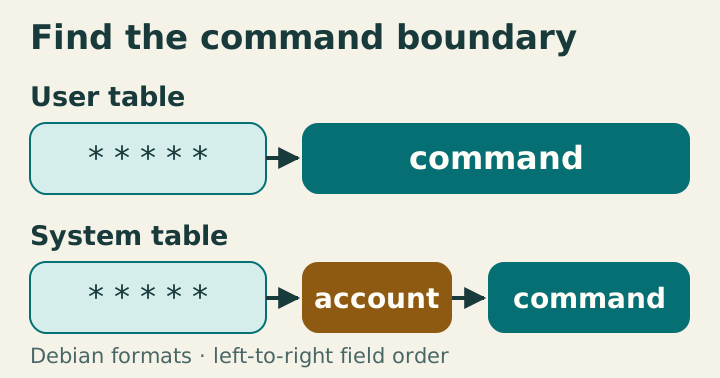
The user-table command follows five calendar fields; the system-table command follows an additional account field.

Cron system and user tables have different contracts

User crontabs belong to one account; system tables can name an account per entry. Copying lines between formats without adjusting fields changes the command boundary. Identify the format before debugging the calendar expression. In Debian user tables the command starts after five fields; system tables insert a username before it. Unescaped percent signs are handled before shell quoting and split off standard input. The figure is schematic; privileged examples were not executed. The account column changes the parser boundary User entries contain minute, hour, day of month, month, day of week, then command text; crontab installs them for the selected user. Debian’s /etc/crontab and /etc/cron.d files insert a username after those five fields. It is not an optional command annotation. ...
January 12, 2028 · 8 min · XB Field Notes
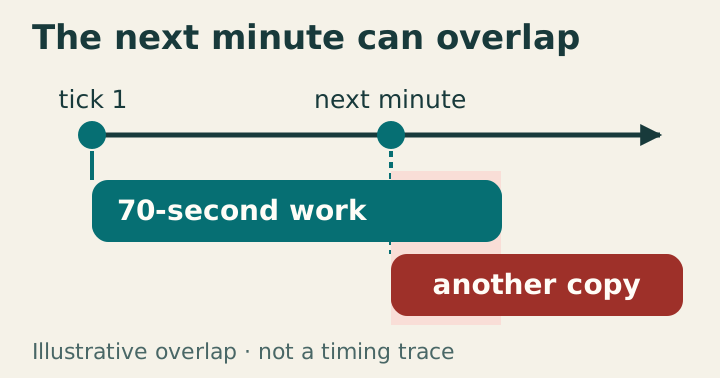
Two calendar ticks start overlapping copies of seventy-second work.

Cron repeats on the calendar

Cron launches commands at matching calendar times without inherently waiting for earlier invocations. Seventy-second work scheduled every minute can therefore overlap. Treat triggering, concurrency, and successful completion as separate responsibilities. The illustrative lanes show the next calendar trigger arriving before a seventy-second invocation ends. A shared nonblocking lock makes the later invocation record a skip; it does not provide exactly-once effects. The source’s prior measurements were not rerun. Read fields as calendar selections A user crontab entry contains minute, hour, day of month, month, day of week, then command. Asterisks select all field values. A minute step such as */15 selects values within each hour, not fifteen minutes since completion. Steps that unevenly divide a field’s range can produce unequal boundary gaps. ...

September 30, 2027 · 7 min · XB Field Notes