文章是本站的原创长文。每篇都保持无脚本、来源可溯,并与本站记录的系统现实一致:一个小型、静态、公网服务如何被构建、加固并保持诚实。
为 systemd 定时器选对时钟和补跑规则
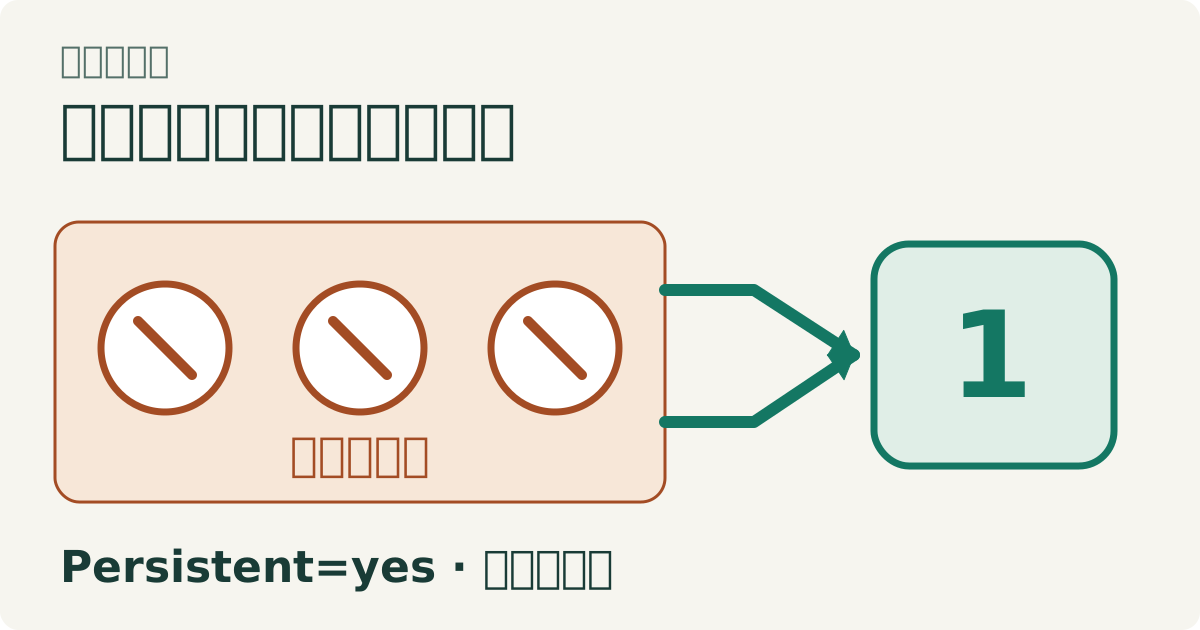
一份计划必须先说清楚“时间”是什么意思。“纽约每天早上九点”指向民用日历,“任务结束十五分钟后”则指向经过时长和一个参考事件。systemd timer 同时支持这两类表达,但它们使用的时钟与起算点不同,在时区变化、系统休眠和定时器停用期间会表现出不同结果。只把它们统称为周期调度,会隐藏本来应该由需求决定的差别。 日历持久化请求一次补触发,不会逐个重放所有遗漏业务周期。日期与三个事件的例子来自原文;本图不增加定时器运行验证证据。 坏掉的样子 OnCalendar 按墙钟日历表达式触发,省略时区通常使用系统本地时区,因此同一份配置在不同机器上可能代表不同实际时刻。夏令时规则变化时,每天相同的本地时间也可能相对 UTC 移动。应使用固定参考日期预览预期表达式,而不是把今天的 UTC 偏移当成全年不变的事实。调度语法能解析,只证明表达式有效,不证明它符合业务要求的地区时间。 单调计时选项明确命名参考事件。OnActiveSec 从 timer 本身激活起算,OnStartupSec 从服务管理器启动起算,OnUnitInactiveSec 从目标单元结束活动起算。这些并不是“隔几分钟运行”的可互换写法。普通单调计时在系统休眠期间暂停,WakeSystem 会改变时钟选择,并依赖平台支持。因此是否计入休眠时间,也应该属于调度需求,而不是部署后的偶然发现。 Persistent=yes 对日历计时器生效。它记录触发时刻,在定时器恢复活动且至少错过一个事件时请求一次补触发;不会逐次重放所有错过的日历时刻,也不能证明上次业务执行成功。如果配置了随机延迟,补触发仍受其影响。触发历史不是一条持久业务队列,不能据此推定停机期间应做的所有工作都已完整保存。 快速验证 在 PID 1 为 systemd、安装了时区数据库的一次性 Linux 系统中,以管理员身份运行下面的 Python 脚本。恢复文本记载的环境为 Debian 12、systemd 252.39,但原始运行日志不可用。本轮没有执行此样例;以下结果说明其预期断言,不能视为本轮实测。脚本先预览日历表达式,再安装两个唯一命名的定时器与服务组合,双方使用同样三个即将到来的日历时刻,全程不会调整机器时钟: from pathlib import Path from tempfile import TemporaryDirectory from datetime import datetime,timezone import subprocess,time,uuid name='xbcatm-calendar-'+uuid.uuid4().hex[:8] names=[name,name+'-plain'];paths=[] def run(*args): result=subprocess.run(args,text=True,capture_output=True,timeout=10) assert result.returncode==0,(args,result.stderr) return result.stdout.strip() preview=run('systemd-analyze','calendar','--base-time=2026-03-07 00:00:00 UTC', '--iterations=3','*-*-* 09:00:00 America/New_York') for expected in ('2026-03-07 14:00:00 UTC','2026-03-08 13:00:00 UTC','2026-03-09 13:00:00 UTC'): assert expected in preview,preview print('09:00 New York: 14:00 UTC before spring DST, 13:00 UTC after it') with TemporaryDirectory(prefix=name+'-',dir='/run') as directory: root=Path(directory);worker=root/'worker.py' worker.write_text("from pathlib import Path\nimport sys\np=Path(sys.argv[1])\nwith p.open('a') as output:output.write('run\\n')\n") now=int(time.time());events=[now+3,now+4,now+5] calendar=''.join('OnCalendar='+datetime.fromtimestamp(t,timezone.utc).strftime('%Y-%m-%d %H:%M:%S UTC')+'\n' for t in events) try: for index,prefix in enumerate(names): service=Path('/run/systemd/system')/(prefix+'.service');timer=service.with_suffix('.timer') assert not service.exists() and not timer.exists() service.write_text(f'[Service]\nType=oneshot\nExecStart=/usr/bin/python3 {worker} {root}/{index}.log\n');paths.append(service) timer.write_text('[Timer]\n'+calendar+'AccuracySec=1ms\nRandomizedDelaySec=0\nPersistent='+('yes' if index==0 else 'no')+'\n');paths.append(timer) run('systemd-analyze','verify',*[str(p) for p in paths]);run('systemctl','daemon-reload') run('systemctl','start',name+'.timer');run('systemctl','stop',name+'.timer') assert not (root/'0.log').exists() and time.time()<events[0] while time.time()<events[-1]+0.15:time.sleep(0.05) run('systemctl','start',name+'.timer',name+'-plain.timer') deadline=time.monotonic()+3 while not (root/'0.log').exists(): assert time.monotonic()<deadline,'catch-up did not run';time.sleep(0.02) time.sleep(0.15) assert (root/'0.log').read_text()=='run\n' and not (root/'1.log').exists() print('three elapsed calendar events: persistent timer catches up once; plain timer does not') run('systemctl','stop',name+'.timer');run('systemctl','start',name+'.timer') time.sleep(0.2);assert (root/'0.log').read_text()=='run\n' print('reactivating with no newly missed event does not replay the job') print('timer inactivity was tested without changing the system clock or rebooting') finally: if paths: run('systemctl','stop',*[p.name for p in paths]) run('systemctl','clean','--what=state',name+'.timer') for path in paths:path.unlink(missing_ok=True) run('systemctl','daemon-reload') 预览从二〇二六年三月夏令时切换前的固定日期开始,询问纽约早上九点的后续发生时刻。第一次对应 UTC 十四点,后两次对应 UTC 十三点,本地钟表时间却始终是九点。这检查的是日历解释,并不是修改主机时区,也不是把系统时间跳到那些日期。对指定地区的每日任务而言,这种偏移变化可能正是正确行为。 ...